When teaching use cases, a question that comes up now and then is what the difference is between a use case and a user story as used on agile projects. There is a lot to be found on the internet discussing this. Two useful references and a start for further investigation are mentioned below. What I try to do here is capture my conclusion of these discussions. But before coming to this, let's briefly discuss what is what.
User Story
A user story is a short statement about what a user wants to do, and why. A user story typically fits on an index card. The idea is that the development team uses this user story as a starting point of a conversation with this user about how this should work in practice, to get an understanding of what needs to be done to support that.
On some projects a particular format is being used for user stories, being "As a ... I want ... so that ...". Reviewing this format it becomes clear that the first ... can be compared with the actor of a use case, and the last one with the goal of a use case (although in many cases tend to be finer-grained). So the big difference apparently is in the middle, where it is described what the actor does to achieve that goal.
Use Case
Next to specifying a goal, a use case captures one or more scenarios describing the interaction between an actor and a system to achieve that goal. Scenarios may be captured using a format like:
1. This use case starts when the actor does ...
2. The system responds by doing ...
3. The actor does ...
...
x. The use case ends when ...
There is one main success scenario (happy path), there may be one or more alternate scenarios (other ways to achieve the same goal), and there may be one or more exception scenarios (describing what happens when that goal is not achieved).
You also capture what triggers the use case (which in many cases will be repeated as the first sentence of the main success scenario), pre-conditions (what needs to be in place when the use case starts), and post-conditions (what will have been achieved when the use case ends).
What's Different?
So, apparently, a use case elaborates more on what the actor does to achieve a goal. A user story has just one statement regarding that and, compared to a use case, concerns just one scenario. Also, compared to a user story, a use case adds a trigger, pre-conditions and post-conditions to that.
Some people say that use cases capture too much detail, and claim that user stories are better for this reason. Other people state that in practice user stories tend to oversimplify things, resulting in the first iterations taking much more time than anticipated. The way to resolve that is by elaborating more on the user story. When you think about it, that makes sense, doesn't it? I mean, at the end of the day even on agile projects the developers need to deal with details as well. They only may do it in a different way.
Conclusion
In my opinion the core difference has best been captured by a guy called Jim Standley who stated that a user story is a promise to have a conversation and a use case is the recording of that conversation.
So rather than arguing if user stories are better than use cases or vise verse, I think the better question is: "How formal do you need to be?". The more formal, the more appropriate use cases start to become.
Added to this, you should also think about "When do we need to be this formal?". I can imagine systems being developed starting with user stories, and then write use cases after the fact, because some external testing team requires that, or because the customer needs it for system maintenance.
Some Suggestions
If you are on an agile project creating use user stories, but you are required or may need to create use cases later on, make sure that a user story matches exactly scenario, and name them uniquely. That should not be too difficult.
Then, when the user stories have been realized and you need to deliver the use cases, you can then use the name of the user story as the name of the corresponding scenario. You combine all user stories that share the same user goal into one use case. Add the trigger, pre-conditions, and post-conditions to that, stir for one minute, and you're done!
Further Reading
Stellman/Green: User Stories vs Use Cases
Discussion at Allistair Cockburn: A user story is to a use case what a gazelle is to a gazebo.
Showing posts with label UML. Show all posts
Showing posts with label UML. Show all posts
Tuesday, May 24, 2011

Thursday, April 29, 2010
BPM & Use Cases, Who's Counting? Revisited
Whenever I have questions about use cases myself, I grab my use case bible which is Writing Effective Use Cases from Alistair Cockburn. One of the sections in that book is named Your Use Case Is Not My Use Case, which discusses that different people writing use cases for different purposes or audiences, may write use cases differently. This posting I also could have named My Use Case Is Not My Use Case, at least not at Different Points in Time, as you will soon find out.
In one of my earlier postings called BPM & Use Cases, Who's Counting? I discuss an example and suggest that some automatic notification activity is part of the preceding interactive activity. Then in a total different context I noticed myself arguing to a colleague that a notification in her use case model was a use case of its own. It then realized that in general this is a better approach.
The following example will show why:
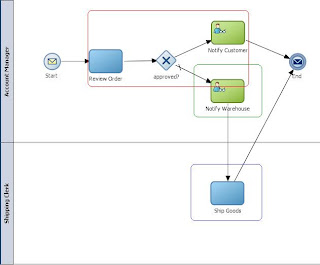
Assuming that the Customer is not a direct user of your system, for the Notify Customer activity you could argue that it would be part of the goal of the Account Manager to notify the customer. But for the Notify Warehouse I find it way more intuitive to claim that it is a goal of the Shipping Clerk to be notified that there is work to do. But that would imply that the first notification would be part of the Review Order use case, while the second notification would be a use case of it's own. Does that sound inconsistent or what?
So I therefore want to change my opinion and suggest that in principle you should consider a notification activity to be a use case of its own, having the one being notified as primary actor (i.e. having the goal). Make sense, not?
In one of my earlier postings called BPM & Use Cases, Who's Counting? I discuss an example and suggest that some automatic notification activity is part of the preceding interactive activity. Then in a total different context I noticed myself arguing to a colleague that a notification in her use case model was a use case of its own. It then realized that in general this is a better approach.
The following example will show why:

Assuming that the Customer is not a direct user of your system, for the Notify Customer activity you could argue that it would be part of the goal of the Account Manager to notify the customer. But for the Notify Warehouse I find it way more intuitive to claim that it is a goal of the Shipping Clerk to be notified that there is work to do. But that would imply that the first notification would be part of the Review Order use case, while the second notification would be a use case of it's own. Does that sound inconsistent or what?
So I therefore want to change my opinion and suggest that in principle you should consider a notification activity to be a use case of its own, having the one being notified as primary actor (i.e. having the goal). Make sense, not?
Wednesday, February 24, 2010
How to Recognize the Requirements in Use Cases?
One of the core values of using a method is that it provides a common "language". That holds for all kind of methods, including those for software engineering. It for example helps when everybody has a same understanding of what a "use case" is. It also helps to have a common format for use cases. Similar to the agreement that (at least in the western culture) we write from left to right, top to bottom, contents at the beginning, index at the end. As is the case with a book, you will appreciate that a common format for use cases not only helps those writing them, but especially those reading them (business as well as IT people).
Next I will discuss a format that I have learned to appreciate very much, and can recommend to everyone who is writing use cases.
If you have not already decided upon a common format, or when you have the opportunity to do so, you may consider writing use cases in a two column format. I learned this technique more than a year ago from a great guy called Vince Bordo (hi Vince!). I practice this technique since then, as I find it to be more effective than what I used to do (i.e. a one-column format).
In practice this looks as in the following example, which is a reformatted version of a use case I used in some previous posting:
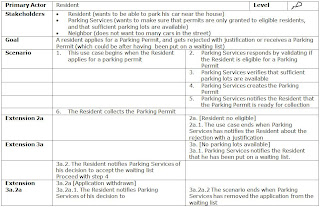
The beauty of this format is that it visually depicts what the system needs to do in order to satisfy the requirements, as that is exactly what the right column is about. The left column describes how actors (primary as well as secondary) interact with the system in order to satisfy the goal of the use case.
In theory (I would not try this in practice, but in theory) you should be able to cut out the right hand column of the use case and only hand that over to the developeras and tell them that this is what they need to realize. That, plus the supplemental requirements of course.
Next I will discuss a format that I have learned to appreciate very much, and can recommend to everyone who is writing use cases.
If you have not already decided upon a common format, or when you have the opportunity to do so, you may consider writing use cases in a two column format. I learned this technique more than a year ago from a great guy called Vince Bordo (hi Vince!). I practice this technique since then, as I find it to be more effective than what I used to do (i.e. a one-column format).
In practice this looks as in the following example, which is a reformatted version of a use case I used in some previous posting:

The beauty of this format is that it visually depicts what the system needs to do in order to satisfy the requirements, as that is exactly what the right column is about. The left column describes how actors (primary as well as secondary) interact with the system in order to satisfy the goal of the use case.
In theory (I would not try this in practice, but in theory) you should be able to cut out the right hand column of the use case and only hand that over to the developeras and tell them that this is what they need to realize. That, plus the supplemental requirements of course.
Thursday, December 03, 2009
Use Cases, Explaining Main Success, Alternate and Exception Scenarios
Once you understand the difference between a main success scenario, an alternate scenario and an exception scenario, you may wonder why it took you so long to get there. The reason probably being that the explanation was pretty abstract, talking about scenario's that do or don't have the same goal, post-conditions that add to or are instead of those of the main success scenario, blah, blah, blah...
Having gone this road myself, I started to wonder if there is a simpler way to explains what should be pretty natural for most of us. And as always, finding an example that relates to day-to-day life did the trick for me to explain it to others. The example being the following.
Suppose that have to drive from A to B. Your goal being to be in time for a customer meeting. The post-condition being that you successfully reached your destination in time.
So the main success scenario is that you drive from A to B, without interruptions.
An alternate scenario would be that you have to take a small detour by going through a gas station to get some gas. An extra post-condition this detour might add to the one of the main success scenario, could be that you have to obtain the gas bill, otherwise you employer won't cover your expenses.
An exception scenario might be that your car breaks down, and you will never be in time for the customer meeting. A post-condition of this exception scenario might be that you have to inform you customer that you have to cancel the meeting. This post-condition replaces the post-condition of the main success scenario.

Other exception scenario's might concerning a serious traffic jam, getting busted for speeding, car-jacking, and so on.
Now that was not too difficult, was it?
Having gone this road myself, I started to wonder if there is a simpler way to explains what should be pretty natural for most of us. And as always, finding an example that relates to day-to-day life did the trick for me to explain it to others. The example being the following.
Suppose that have to drive from A to B. Your goal being to be in time for a customer meeting. The post-condition being that you successfully reached your destination in time.
So the main success scenario is that you drive from A to B, without interruptions.
An alternate scenario would be that you have to take a small detour by going through a gas station to get some gas. An extra post-condition this detour might add to the one of the main success scenario, could be that you have to obtain the gas bill, otherwise you employer won't cover your expenses.
An exception scenario might be that your car breaks down, and you will never be in time for the customer meeting. A post-condition of this exception scenario might be that you have to inform you customer that you have to cancel the meeting. This post-condition replaces the post-condition of the main success scenario.

Other exception scenario's might concerning a serious traffic jam, getting busted for speeding, car-jacking, and so on.
Now that was not too difficult, was it?
Monday, September 28, 2009
BPM & Use Case, Who's Counting?
(O)BPM and Use Cases
Business process modeling and implementation using the Oracle BPM Suite should be an iterative process. Because of that you try to postpone the need to create (paper) specifications as long as possible. After all, your running BPM prototype is the specification. Otherwise, while you are iterating, the paper specification would need to be changed as well, resulting in a lot of overhead which would not add much value, but cost the more.
However in some situations it me be necessary to create (preferably nearly after-the-fact) specifications, for any combination of the following reasons:
A Quiz
Now let's do a quiz and count use cases in a simple BPMN diagram that has been created with OBPM. For those that are not familiar with use case modeling: a use case captures requirements from the perspective of an actor that wants to achieve some goal using the system. So how many use cases do you count in the following business process, when for now you ignore the Receive Order by JMS activity?

The good answer is three. In case you had another answer, read on!
Counting Use Cases
The first use case is Place Order. The (primary) actor is the customer, and the goal is placing an order. The global interactive activity Place Order covers that, and will kick of the process. As a result the first thing that will happen, is that the system automatically notifies the account manager through the automatic Notify Account Manager activity. You may think this is the second use case, but consider this:
Still Not Convinced?
When your thinking was that the notification is part of the second use case, which by the way is Handle Order, consider this. The receiving of the notification by the account manager may have happened much earlier than the actual handling of the order by that account manager. So the notification itself is not an integral part of the single setting in which the account manager handles the order. So, yes receiving the notification is the trigger of the Handle Order use case, but not part of that use case itself (i.e. not the first step of the scenario).
For a similar reason as discussed for the Place Order use case, the (automatic) Create Back-order activity is part of the Handle Order use case. The creation of the back-order actually is handled through an alternate scenario of the Handle Order use case.
The last and final use case is the Ship Order, obviously.
Requirements vs Solutions
Now let's review the Receive Order by JMS activity, and let's assume that this only supports a different channel through which the same customer can place an order. The JMS queue may for example be used to pass in some SMS message. From a requirements perspective you can state that this is part of the Place Order use case. The argument being that using a OPBM screen or sending a text message are just two different solutions to the same actor goal: placing an order. Supporting different channels is "just" a supplemental requirement for the Place Order use case.
Now if you really think about it, you probably will agree with me that when doing a more detailed analysis of the Place Order use case, will reveal several reasons for (in the end) having at least two use cases, one for placing the order through a screen and another one for placing it by SMS. If you are a fancy use case modeler you could even model the Place Order use case as a super-type use case, having to siblings: Place Order through Workspace and Place Order by SMS.
So when you had "four" or "five" as your answer, depending on your reasoning, you might have been correct as well.
Introducing a Timer
Another interesting aspect to consider is what happens when the Notify Account Manager activity is not done directly after the customer issued the order, but for example by a trigger at 8:00 in the morning. In that case, the notification is no longer part of the single setting Place Order.
Mind that for the reason explained earlier, this still does not mean that the notification becomes part of the Handle Order use case. But who is the primary actor here and who is having the goal? In this case the primary actor is the timer. It depends on how you formulate the goal, but for reasons of simplicity, let's assume that it is the customer having a goal of the account manager handling the order as soon as possible. But granted, it is debatable.
Conclusion
So, in conclusion: unless there is a timer involved, all automatic activities are part of the interactive use case that precedes them, which may be outside the OBPM process (in another system sending the message).
Business process modeling and implementation using the Oracle BPM Suite should be an iterative process. Because of that you try to postpone the need to create (paper) specifications as long as possible. After all, your running BPM prototype is the specification. Otherwise, while you are iterating, the paper specification would need to be changed as well, resulting in a lot of overhead which would not add much value, but cost the more.
However in some situations it me be necessary to create (preferably nearly after-the-fact) specifications, for any combination of the following reasons:
- Acquire official approval of the detailed requirements
- Support change control
- Provide the base for test scenarios.
A Quiz
Now let's do a quiz and count use cases in a simple BPMN diagram that has been created with OBPM. For those that are not familiar with use case modeling: a use case captures requirements from the perspective of an actor that wants to achieve some goal using the system. So how many use cases do you count in the following business process, when for now you ignore the Receive Order by JMS activity?

The good answer is three. In case you had another answer, read on!
Counting Use Cases
The first use case is Place Order. The (primary) actor is the customer, and the goal is placing an order. The global interactive activity Place Order covers that, and will kick of the process. As a result the first thing that will happen, is that the system automatically notifies the account manager through the automatic Notify Account Manager activity. You may think this is the second use case, but consider this:
- The notification is triggered by entering the order by the customer
- The notification will take place immediately after entering the order, right after the user pressed the submit button.
Still Not Convinced?
When your thinking was that the notification is part of the second use case, which by the way is Handle Order, consider this. The receiving of the notification by the account manager may have happened much earlier than the actual handling of the order by that account manager. So the notification itself is not an integral part of the single setting in which the account manager handles the order. So, yes receiving the notification is the trigger of the Handle Order use case, but not part of that use case itself (i.e. not the first step of the scenario).
For a similar reason as discussed for the Place Order use case, the (automatic) Create Back-order activity is part of the Handle Order use case. The creation of the back-order actually is handled through an alternate scenario of the Handle Order use case.
The last and final use case is the Ship Order, obviously.
Requirements vs Solutions
Now let's review the Receive Order by JMS activity, and let's assume that this only supports a different channel through which the same customer can place an order. The JMS queue may for example be used to pass in some SMS message. From a requirements perspective you can state that this is part of the Place Order use case. The argument being that using a OPBM screen or sending a text message are just two different solutions to the same actor goal: placing an order. Supporting different channels is "just" a supplemental requirement for the Place Order use case.
Now if you really think about it, you probably will agree with me that when doing a more detailed analysis of the Place Order use case, will reveal several reasons for (in the end) having at least two use cases, one for placing the order through a screen and another one for placing it by SMS. If you are a fancy use case modeler you could even model the Place Order use case as a super-type use case, having to siblings: Place Order through Workspace and Place Order by SMS.
So when you had "four" or "five" as your answer, depending on your reasoning, you might have been correct as well.
Introducing a Timer
Another interesting aspect to consider is what happens when the Notify Account Manager activity is not done directly after the customer issued the order, but for example by a trigger at 8:00 in the morning. In that case, the notification is no longer part of the single setting Place Order.
Mind that for the reason explained earlier, this still does not mean that the notification becomes part of the Handle Order use case. But who is the primary actor here and who is having the goal? In this case the primary actor is the timer. It depends on how you formulate the goal, but for reasons of simplicity, let's assume that it is the customer having a goal of the account manager handling the order as soon as possible. But granted, it is debatable.
Conclusion
So, in conclusion: unless there is a timer involved, all automatic activities are part of the interactive use case that precedes them, which may be outside the OBPM process (in another system sending the message).
Friday, August 22, 2008
About Business Processes, Use Cases & SOA (4 & End)
This posting is a follow-up on a previous posting in which I explained what artifacts might be appropriate in case of creating an analysis model out of a set of system use cases for a SOA project.
In this third and last posting, I will show how the (platform independent) analysis model can be transformed into a (platform specific) design that leverages BPEL.
Design
In this third and last posting, I will show how the (platform independent) analysis model can be transformed into a (platform specific) design that leverages BPEL.
Design
The design involves mapping the analysis to artifacts that actually are implemented. Assuming that the Technical Architecture dictates a Service Oriented Architecture that uses BPEL to implement services and service orchestration, the design would at least include the following:
- WSDL’s
- A diagram design of the BPEL processes to implement
- A database design (that supports retrieval of resident information and storage and retrieval of parking permits and their applications)
To show how the implementation might look like the following two BPEL process diagrams are included.
A part of the ParkingPermitProcess looks as follows:

The same holds true for the user goal level Validate Parking Permit use case that looks as in the following picture (that actually zooms in on the ValidateParkingPermitApplication step of the previous picture):

In practice, you can imagine a human workflow step to be included that supports manual intervention of the outcome by Parking Services.
This ends a short history about the road you could walk from business process modeling to a BPEL implementation, and that with use cases as well. Now was that impressive or what?!
Thursday, August 14, 2008
About Business Processes, Use Cases & SOA (3)
This posting is a follow-up on a previous posting in which I explained business process models can be drilled down to user-goal level use cases and how to do service discovery based upon process models.
In this third posting, I will show how the requirements that have been captured so far, can be transformed into an analysis model that will provide the base to build the design on.
Analysis
What kind of artifacts should be created during the Analysis process depends on the nature of the use cases and the architecture that is going to be used to implement them. The most apparent candidates for adding detail are activity or sequence diagrams, class diagrams and (where useful) collaboration diagrams (used to describe how various “components” work together). For SOA projects also message descriptions and message transformations are obvious candidates.
For services that support more than one operation you also need to specify the names of each individual operation, as well as the types of their iand output messages.
Depending on its granularity, a service supports a summary use case (like the Parking Permit process), a user goal use case (like Apply for Parking Permit) or a subfunction use case. No example of the latter has been included, but you can imagine that for each separate channel (letter, email, SMS) a subfunction use case could be created that describes a generic notification services that can be used to send all kind of notifications to third parties.
Unless parallel development is be done where other (parts of the) system(s) depend on a service to be build, at this point there is not much value in specifying the exact WSDL of the service. For any external service you use, you need to have at least the WSDL location if not the WSDL itself.
Activity Diagrams
When there is a flow involved, it might be useful to create an activity diagram. An obvious example would be a use case for a service that will be implemented as a BPEL process. As already noted, the activity diagram for the Validate Parking Application is an example of that. But use cases that involve a user interface with a complex screen flow, also are good candidates.
Class Diagrams
When there is data involved, a class diagram seems to be the obvious choice to document that. Many people doing SOA projects never seem to make a class diagram. Realize though that class diagrams add as much value to SOA projects as they for example do to pure Java/XML projects, as messages are about handling data as well. Having class diagrams available can add great value to optimizing the process of defining message formats and transformations.
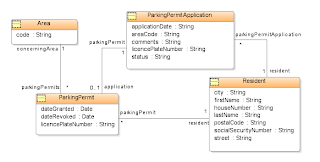
When analyzing the Parking Permit use case the following classes can be recognized: Resident, Parking Permit Application, and Parking Permit. A distinction has been made between Parking Permit Application and Parking Permit, as not all applications will result in a permit, and the application follows a process with statuses that do not apply to the permit itself and vise verse.
Not very explicit in the description but obviously needed if you think about it, is a notion of an Area. You will need this in the process of determining if there are sufficient parking lots available. You might argue that the reason for not having discovered this earlier is because the way the waiting list is being processed has not been worked out to the proper level of detail.
The class diagram for the Parking Permit use case could look as in the following figure:


In this third posting, I will show how the requirements that have been captured so far, can be transformed into an analysis model that will provide the base to build the design on.
Analysis
What kind of artifacts should be created during the Analysis process depends on the nature of the use cases and the architecture that is going to be used to implement them. The most apparent candidates for adding detail are activity or sequence diagrams, class diagrams and (where useful) collaboration diagrams (used to describe how various “components” work together). For SOA projects also message descriptions and message transformations are obvious candidates.
For services that support more than one operation you also need to specify the names of each individual operation, as well as the types of their iand output messages.
Depending on its granularity, a service supports a summary use case (like the Parking Permit process), a user goal use case (like Apply for Parking Permit) or a subfunction use case. No example of the latter has been included, but you can imagine that for each separate channel (letter, email, SMS) a subfunction use case could be created that describes a generic notification services that can be used to send all kind of notifications to third parties.
Unless parallel development is be done where other (parts of the) system(s) depend on a service to be build, at this point there is not much value in specifying the exact WSDL of the service. For any external service you use, you need to have at least the WSDL location if not the WSDL itself.
Activity Diagrams
When there is a flow involved, it might be useful to create an activity diagram. An obvious example would be a use case for a service that will be implemented as a BPEL process. As already noted, the activity diagram for the Validate Parking Application is an example of that. But use cases that involve a user interface with a complex screen flow, also are good candidates.
Class Diagrams
When there is data involved, a class diagram seems to be the obvious choice to document that. Many people doing SOA projects never seem to make a class diagram. Realize though that class diagrams add as much value to SOA projects as they for example do to pure Java/XML projects, as messages are about handling data as well. Having class diagrams available can add great value to optimizing the process of defining message formats and transformations.
When analyzing the Parking Permit use case the following classes can be recognized: Resident, Parking Permit Application, and Parking Permit. A distinction has been made between Parking Permit Application and Parking Permit, as not all applications will result in a permit, and the application follows a process with statuses that do not apply to the permit itself and vise verse.
Not very explicit in the description but obviously needed if you think about it, is a notion of an Area. You will need this in the process of determining if there are sufficient parking lots available. You might argue that the reason for not having discovered this earlier is because the way the waiting list is being processed has not been worked out to the proper level of detail.
The class diagram for the Parking Permit use case could look as in the following figure:

Message Descriptions
What format to use for a message descriptions probably foremost depends on who needs to validate it. Some people will prefer more “logical” descriptions in Word, while more technical oriented people probably have no problems with XSD’s.
Mind that to be able to create XSD’s that translate 1:1 to an implementation, it is important to understand the technique of implementing messaging. For example, initially one XSD has been created for the Resident and one for the Parking Permit Application, only to discover that it was more practical to create one XSD containing both and use that as the format for the message going from the resident to the Parking Process service. If you pay more attention to detailing the Apply for ParkingPermit use case, you probably would find that out up front.
For the sake of example the response message has been kept simple by returning a string stating that the application has been received successfully. The description of the request message looks as follows:

Other message descriptions that need to be made are the request and response messages for the Verify Ownership, Verify Electoral Registers and Verify Residence use cases.
You should keep the message descriptions separate from the use case descriptions, to support reuse. Refer to them from the use case descriptions instead.
Message Transformations
How message are transformed from one format to the other depends on the situation. For example, in case of BPEL, transformations can be done by doing one or more assign operations or by using an XSLT transformation, which in both cases may involve complex XPath queries or regular expressions.
For this reason transformations probably are best described in text, as has been done in the following example:

The example is trivial in that transformation consists of using a subset of the fields of the source and mapping those 1:1 on fields of the target message.
You can image than in practice often more complex transformations need to be done, for example in case of n:m mappings. In practice using a two-column format often suffices, where the (left) Source/Transformation column specifies which source fields are involved and any logic that needs to be applied to that, and where the (right) Target column specifies what the (single) target field is.
As with message formats you should keep the message transformations separate from the use case descriptions to support reuse.
Where to Stop
Once the analysis model has been worked out to a sufficient level of detail, you are ready for the design. What “sufficient” means in this context, depends on many factors, the most important ones being the following:
Nature of Engagement
In some cases a formal process needs to be followed that requires every change of the specifications to be approved up-front. On the other side of the spectrum there is the agile approach by which part of the (detailed) requirements are captured while validating iterations of a working program.
Skills and Habits of Developers
Developers are most comfortable with what they are used used to working with. However, you should be aware that when every developer involved needs to get used to one broadly accepted way of creating specifications almost always outclasses the situation in which developers need to get used to as many different styles as there are other developers. Not to mention the effort that needs to be put into the validation process involved with that.
For most projects that involve requirements analysis, class models are very useful to developers, even in the case of BPEL development.
Application and Technical Architecture
The development of data-oriented systems that depend on a well-structured database can highly benefit from creating a detailed class diagram. In case of use cases that involve a user interface, activity diagrams normally only add value when there is a complex dialog involved.
For SOA projects that primarily deal with messaging it probably suffices to detail classes to the level that all attributes and their types are known. Message formats and transformations often need to be worked out in detail. In general, activity or sequence diagrams add great value to business processes and services, as they support a more effective implementation.
Other architectures, for example identity management/security, on their turn require yet other details.
A final remark that needs to be made at this point is that use case analysis should not be confused for a technical design. Although some people state that class models, and activity diagrams that describe system-internal behavior, are “technical” they actually only capture detailed requirements or validate higher-level requirements from a different angle.
Friday, April 11, 2008
About Business Processes, Use Cases & SOA (2)
This posting is a follow-up on a previous posting in which I explained how business process models and use cases can be used to capture requirements. It especially highlighted how use cases can be used for aspects that might not that easily be captured using business processes alone.
In this second posting, I will give an example how the business process model of the previous example is drilled down to ensure that all nodes in that model are of the level of user-goals, and what the benefit of that is. I will also discuss a way to discover services from the business process model.
Drilling Down Business Process Models
When looking at the business process of the previous posting, you might notice that each activity actually is a use case of its own, most of them being at the level of user-goal use cases (which is a use case for which the user can execute it in one session and walk away happily after that). The only exception might be the Validate Parking Permit use case, that for that reason has been drilled down further to investigate if this really is at a level of a user-goal.
The result is the following Validate Parking Permit Application business process model:

As illustrated in this model, a couple of other organizations are involved in the validation, possibly making it a lengthy process, and initially suggesting that the upper level activity indeed is not a user goal level use case. But what if the other organizations have automated services available that respond within seconds? What this shows is that the level of a use case in some cases depends on the options for implementing it. This certainly is true in case of a Service Oriented Architecture.
For the following it will be assumed that such services do exist, making the Validate Parking Permit Application activity indeed an activity at the level of user-goal use cases. In the context of the Oracle Unified Method this automatically classifies the diagram above part of the use case details rather than a business process.
However, the question if it is a business process model or just use case details, is just an academic one. What is important is that you have a clear idea of when a business process needs to be further detailed. It is advisable to drill them down to the level of user-goals, for the following reasons:
(*) Business use cases have the business as subject and are written by business analysts to document business processes. System use cases have the system as subject and are written by system developers to document how actors communicate with the system to achieve their goals.
Service Discovery
Assuming that the requirements so far point to a solution using a Service Oriented Architecture, it is imperative to discover the services in the requirements. This is not only important for creating the application architecture but also provides important input to the estimating process.
One of the reasons to do business process modeling in the first place is that it relates very well to a Service Oriented Architecture, which makes implementation of the business process itself possible. You can imagine that the Parking Permit process is implemented as a longer running process that may take weeks to complete. But that will not be the only service involved, as the Parking Permit process itself needs other services to complete.
There are several approaches to discover services. One of them being by reviewing a business process and identify where the transitions are from an activity of one actor (swimlane) to that of another. In general this indicates a candidate service. In the example the candidate services are in the activities:
The Apply for Parking Permit candidate service obviously is the starting point for the Parking Permit process itself. You can imagine that the web site of the municipality provides some form that the resident can fill out and on submit calls the Parking Permit process.
The Notify Resident of Rejection, Notify Resident of Waiting List and Notify Resident Permit Ready for Collection (from Parking Services to the Resident) are candidate services whereby the Parking Service process needs to call out some provider that handles multi-channel notifications to third parties. Whether this will be one service that can handle some generic notification, or three different services that each handle a specific notification type, or any other combination, is a design decision and at this stage is yet to be determined. Mind you, we are analyzing the business and capturing requirements, not yet defining the solution!
The Notify Parking Services of Decision points to yet another candidate service that the Resident can call to get the application removed from the waiting list.
The Verify Vehicle Ownership, Verify Electoral Register and Verify Residence already have been indicated as existing services. However, if they were not, creating them would have been outside the scope of the Parking Permit process, as those services would then have to be created by third parties not involved in the project.
From the last example above, we can conclude that transitions to activities within the scope of secondary actors that are not within the scope of the project, only indicate calls to external services.
Prototyping the User Interface
Any use case that has a user interface associated with it, might be detailed with a conceptual screen layout. Note that a conceptual screen layout is not a design, as it does not specify an actual screen layout, let alone aspects like styling. It’s main purpose is to specify which data should be shown, and should be validated during the review.
Depending on if and when you start creating a Domain Model to identify the business entities involved, conceptual prototypes provide input to or can be use to validate that model.
For example the use case Apply For Parking Permit could be detailed with a screen layout as follows:

Other use cases that may require some conceptual layout are the following:
When analyzing the Validate Parking Permit Application use case, you may find that Parking Services wants to be able to override the decision that comes out of the verification, for example by blocking a parking permit for someone that appears to hire a garage box (which none of the external organizations would note). In that case that use case also would require a conceptual screen layout.
To be continued ....
In this second posting, I will give an example how the business process model of the previous example is drilled down to ensure that all nodes in that model are of the level of user-goals, and what the benefit of that is. I will also discuss a way to discover services from the business process model.
Drilling Down Business Process Models
When looking at the business process of the previous posting, you might notice that each activity actually is a use case of its own, most of them being at the level of user-goal use cases (which is a use case for which the user can execute it in one session and walk away happily after that). The only exception might be the Validate Parking Permit use case, that for that reason has been drilled down further to investigate if this really is at a level of a user-goal.
The result is the following Validate Parking Permit Application business process model:

As illustrated in this model, a couple of other organizations are involved in the validation, possibly making it a lengthy process, and initially suggesting that the upper level activity indeed is not a user goal level use case. But what if the other organizations have automated services available that respond within seconds? What this shows is that the level of a use case in some cases depends on the options for implementing it. This certainly is true in case of a Service Oriented Architecture.
For the following it will be assumed that such services do exist, making the Validate Parking Permit Application activity indeed an activity at the level of user-goal use cases. In the context of the Oracle Unified Method this automatically classifies the diagram above part of the use case details rather than a business process.
However, the question if it is a business process model or just use case details, is just an academic one. What is important is that you have a clear idea of when a business process needs to be further detailed. It is advisable to drill them down to the level of user-goals, for the following reasons:
- User goals provide the most effective level to start from and create system use cases from business use cases to describe what the system should do (*). For example, it is at the level of user-goal business use cases that you will decide whether a goal will be kept manual or supported by a system.
- You typically either implement a user-goal level use case or you do not implement it at all, making it the optimal unit to estimate and trace requirements from there.
(*) Business use cases have the business as subject and are written by business analysts to document business processes. System use cases have the system as subject and are written by system developers to document how actors communicate with the system to achieve their goals.
Service Discovery
Assuming that the requirements so far point to a solution using a Service Oriented Architecture, it is imperative to discover the services in the requirements. This is not only important for creating the application architecture but also provides important input to the estimating process.
One of the reasons to do business process modeling in the first place is that it relates very well to a Service Oriented Architecture, which makes implementation of the business process itself possible. You can imagine that the Parking Permit process is implemented as a longer running process that may take weeks to complete. But that will not be the only service involved, as the Parking Permit process itself needs other services to complete.
There are several approaches to discover services. One of them being by reviewing a business process and identify where the transitions are from an activity of one actor (swimlane) to that of another. In general this indicates a candidate service. In the example the candidate services are in the activities:
- Apply for Parking Permit
- Notify Resident of Waiting List
- Notify Parking Service of decision
- Notify Resident Permit Ready for Collection
- Collect Parking Permit
- Verify Vehicle Ownership
- Verify Electoral Register
- Verify Residence
The Apply for Parking Permit candidate service obviously is the starting point for the Parking Permit process itself. You can imagine that the web site of the municipality provides some form that the resident can fill out and on submit calls the Parking Permit process.
The Notify Resident of Rejection, Notify Resident of Waiting List and Notify Resident Permit Ready for Collection (from Parking Services to the Resident) are candidate services whereby the Parking Service process needs to call out some provider that handles multi-channel notifications to third parties. Whether this will be one service that can handle some generic notification, or three different services that each handle a specific notification type, or any other combination, is a design decision and at this stage is yet to be determined. Mind you, we are analyzing the business and capturing requirements, not yet defining the solution!
The Notify Parking Services of Decision points to yet another candidate service that the Resident can call to get the application removed from the waiting list.
The Verify Vehicle Ownership, Verify Electoral Register and Verify Residence already have been indicated as existing services. However, if they were not, creating them would have been outside the scope of the Parking Permit process, as those services would then have to be created by third parties not involved in the project.
From the last example above, we can conclude that transitions to activities within the scope of secondary actors that are not within the scope of the project, only indicate calls to external services.
Prototyping the User Interface
Any use case that has a user interface associated with it, might be detailed with a conceptual screen layout. Note that a conceptual screen layout is not a design, as it does not specify an actual screen layout, let alone aspects like styling. It’s main purpose is to specify which data should be shown, and should be validated during the review.
Depending on if and when you start creating a Domain Model to identify the business entities involved, conceptual prototypes provide input to or can be use to validate that model.
For example the use case Apply For Parking Permit could be detailed with a screen layout as follows:

Other use cases that may require some conceptual layout are the following:
- Notify Resident of Rejection (mail/email/SMS)
- Notify Resident of Waiting List (mail/email/SMS)
- Notify Parking Services of Decision (mail, screen)
- Notify Resident Permit Ready for Collection (mail/email/SMS)
When analyzing the Validate Parking Permit Application use case, you may find that Parking Services wants to be able to override the decision that comes out of the verification, for example by blocking a parking permit for someone that appears to hire a garage box (which none of the external organizations would note). In that case that use case also would require a conceptual screen layout.
To be continued ....
Friday, March 21, 2008
About Business Processes, Use Cases & SOA (1)
It is my observation that since the introduction of SOA (Service Oriented Architecture) many developers are kind of lost when it comes to capturing requirements and doing design. Quite a few people already got lost during the "giant leap" from relational to object-oriented analysis and design, and (around the same time) had to jump from waterfall to iterative, and more recently from plan-based to agile project approaches. But since SOA too many people have no clue whatsoever how to properly write down customer requirements instead of producing designs of some services (if they even understand the difference).
Apparently some of us are convinced that "legacy" methods like the Unified Process do not properly address the issue of services. What I sometimes hear (and I don't exaggerate) is that a service delivers some reusable piece of functionality that cannot be pinpointed to a specific use case, so use case are useless. The best they can deliver is some flow diagram representing an orchestration of some services and call that a "business process".
Even when I was still clueless about SOA, I already found that hard to believe. What has become so different about user requirements since there is SOA that we cannot capture them as we used to? Has SOA really changed the way we think about requirements similar to how the Star Trek transporter will redefine the concept of transportation in a future near us? Does this question sounds rhetorical to you?
With this article and a couple yet to come, I hope to shed some light on this matter and help you to become aware that the world still turns and it is not you who is spinning around. As an example of this I will try to explain a way (not the but a way) of how you can capture requirements in a business process, and from there go to use case descriptions and finally implement services based on that.
As you might expect from me I will present this in the context of Oracle Unified Method (OUM), but don't let that scare you off. The targeted development environment will be BPEL.
The Case
The case I will use is of moderate complexity. The following activity diagram documents a business process concerning the application of a parking permit by a resident of some municipality.
 At this point it is important to point out that this is a true "business process", as it only concerns business level actors like people, or organization units, and totally abstracts from any system supporting it. At this point the whole process could be manual, for all you know.
I find that important to point out as too often I have seen the situation in which the "analysis" is limited to a description of how some system is going to be implemented rather than on capturing requirements. You should only skip that latter step when you do it consciously and the risk of missing something that proves to be important later on is relatively small.
What might surprise you, is that the same business flow can be documented as a use case description, typically of the scope "enterprise" (that is cross organization-unit). In this case it also concerns a business use case, as it describes how the resident communicates with Parking Services, which in this context is an organization, rather than how this resident communicates with some system.
The Use Case
Presented as a use case the same business process could look as follows:

Normally a use case will not be created in one blow at this level of detail. It is more likely to be created in a few iterations of which the first one might suffice to document only the stakeholders, goal and main success scenario together with some business rules. In OUM this is what the Business Requirements process is supposed to be limited to. The example use case has been worked out to a greater level of detail, which would typically be done in the Requirements Analysis process.
How Use Cases Add Value
Compared for example with the situation where only a business process diagram is available, adding use cases adds value in that a (detailed) use case description provides the opportunity to specify aspects of the business process that goes beyond that of what you can express with only a diagram.
One of those aspects is stakeholders that are not directly involved in the process. In some cases identifying such stakeholders might give reason to extend the scope of the use case, like identifying the stakeholder Neighbor might have lead to considering to include in the business process a step that notifies them as well.
Other aspects that the diagram does not cover are the goals, the triggers, preconditions, and postconditions of the use case. All of them helping to validate the use case and some of them providing useful input for the next step in which the use case is going to be analyzed.
An advantage of putting it down in writing that may not be so clear at first sight is that by forcing yourself to express the business process in words might help you to discover flaws and omissions in the original process.
The value of putting effort in converting a business process into a use case description is not always easy to determine. It depends on many factors like the ability of people reviewing the business process to identify flaws in it, or how easy it is to correct errors later in the process. Probably the best advice would be: when in doubt, don’t hesitate and just do it. In case of the example the business process has been converted into a use case description in less than half an hour. The total process took much more time, but that was because the business process model needed to be corrected, because of errors found while describing the use case.
To be continued ...
Apparently some of us are convinced that "legacy" methods like the Unified Process do not properly address the issue of services. What I sometimes hear (and I don't exaggerate) is that a service delivers some reusable piece of functionality that cannot be pinpointed to a specific use case, so use case are useless. The best they can deliver is some flow diagram representing an orchestration of some services and call that a "business process".
Even when I was still clueless about SOA, I already found that hard to believe. What has become so different about user requirements since there is SOA that we cannot capture them as we used to? Has SOA really changed the way we think about requirements similar to how the Star Trek transporter will redefine the concept of transportation in a future near us? Does this question sounds rhetorical to you?
With this article and a couple yet to come, I hope to shed some light on this matter and help you to become aware that the world still turns and it is not you who is spinning around. As an example of this I will try to explain a way (not the but a way) of how you can capture requirements in a business process, and from there go to use case descriptions and finally implement services based on that.
As you might expect from me I will present this in the context of Oracle Unified Method (OUM), but don't let that scare you off. The targeted development environment will be BPEL.
The Case
The case I will use is of moderate complexity. The following activity diagram documents a business process concerning the application of a parking permit by a resident of some municipality.
 At this point it is important to point out that this is a true "business process", as it only concerns business level actors like people, or organization units, and totally abstracts from any system supporting it. At this point the whole process could be manual, for all you know.
I find that important to point out as too often I have seen the situation in which the "analysis" is limited to a description of how some system is going to be implemented rather than on capturing requirements. You should only skip that latter step when you do it consciously and the risk of missing something that proves to be important later on is relatively small.
What might surprise you, is that the same business flow can be documented as a use case description, typically of the scope "enterprise" (that is cross organization-unit). In this case it also concerns a business use case, as it describes how the resident communicates with Parking Services, which in this context is an organization, rather than how this resident communicates with some system.
The Use Case
Presented as a use case the same business process could look as follows:

Normally a use case will not be created in one blow at this level of detail. It is more likely to be created in a few iterations of which the first one might suffice to document only the stakeholders, goal and main success scenario together with some business rules. In OUM this is what the Business Requirements process is supposed to be limited to. The example use case has been worked out to a greater level of detail, which would typically be done in the Requirements Analysis process.
How Use Cases Add Value
Compared for example with the situation where only a business process diagram is available, adding use cases adds value in that a (detailed) use case description provides the opportunity to specify aspects of the business process that goes beyond that of what you can express with only a diagram.
One of those aspects is stakeholders that are not directly involved in the process. In some cases identifying such stakeholders might give reason to extend the scope of the use case, like identifying the stakeholder Neighbor might have lead to considering to include in the business process a step that notifies them as well.
Other aspects that the diagram does not cover are the goals, the triggers, preconditions, and postconditions of the use case. All of them helping to validate the use case and some of them providing useful input for the next step in which the use case is going to be analyzed.
An advantage of putting it down in writing that may not be so clear at first sight is that by forcing yourself to express the business process in words might help you to discover flaws and omissions in the original process.
The value of putting effort in converting a business process into a use case description is not always easy to determine. It depends on many factors like the ability of people reviewing the business process to identify flaws in it, or how easy it is to correct errors later in the process. Probably the best advice would be: when in doubt, don’t hesitate and just do it. In case of the example the business process has been converted into a use case description in less than half an hour. The total process took much more time, but that was because the business process model needed to be corrected, because of errors found while describing the use case.
To be continued ...
Wednesday, October 24, 2007
Demystifying Business Process vs Use Case Modeling
The other day I was part of an interesting discussion that started with the statement that there is a problem with OUM (Oracle Unified Method), or to be more precise the Unified Process being use case centric, while these days much development is based on business process modeling. The problem being that because of this people involved with business process modeling might think that OUM does not properly fit their needs.
I often hear people talk about use cases, and too often find out they actually do not know what a use case is. I’m convinced that anyone that does know both business process modeling and use case modeling, would not say such a thing as they would realize that a business process model is just another representation of the same thing.
Let me explain and convince you that OUM supports business process modeling quite well and does so for as long as it is there.
Now, I’m not going to explain what use case modeling all is about, but rather point you to the white paper. I wrote about that subject. However, what I probably do need to explain is that you can have use cases at different levels. My paper is based on OUM and the original work of Alistair Cockburn, who presents the following levels:

Before I continue I need to make the distinction between the conceptual notion "use case", being the interaction of an actor with a system to achieve a specific goal, and a "use case description", being a narrative description of that interaction.
The key point that I’m trying to make here is that a use case should be specified as a scenario. You might realize that at every level you can describe that scenario either by using a use case description, as an activity diagram or both, whatever suits your needs. And you might also be aware that at any level above the user goal use cases, an activity diagram actually is a description of a business process at some level. So there you are ...
What some of you folks that are into the Business Process Modeling Notation (BPMN) might not be aware of, is that UML activity modeling and BPMN just are two different schema techniques for doing the same task, as is clearly explained in a white paper by Stephen A. White. OK, granted, some patterns are more effectively handled by BPMN (like the concept of ad-hoc process to support the Interleaved Parallel Routing pattern), but that concerns minor details only.
So now I proved that a business process model and a use case description can describe the same thing, I hope with that you realize that the only thing you need to do to transform a business process model into a use case description, is by creating a narrative description out of that. But let me bring this academic discussion down to a practical level and discuss how to get from business process models to use cases. Otherwise, why bother, right?
Mind that narrating a business process results in a summary use case description. Many people not being aware that there are different levels of use cases, probably will use the notion "use cases" only to mean the user-goal level use case descriptions, a use-goal use case being defined as a use case for which the primary actor can go away happily after finishing it. If you are not aware of this it is likely you will have a hard time working with use cases. Just to warn you.
When going from business process models to user cases, you will be aiming at a model of user-goal use cases (and a couple of subfunction use cases going with that) as normally that should be the lowest level at which you capture requirements. Before you can do so, you need to make sure that the lowest level business process models contain activities at the level of user-goal use cases only. If that is not the case, fix that first.
Once that has been done you need to take just one more step from there. How you do that is up to you of course, but you could create a use case description for each activity in that diagram that is a candidate for being implemented and start detailing from there. Whenever useful, you can add an UML activity diagram to that. To prevent confusion, you probably better not use BPMN for that.
I often hear people talk about use cases, and too often find out they actually do not know what a use case is. I’m convinced that anyone that does know both business process modeling and use case modeling, would not say such a thing as they would realize that a business process model is just another representation of the same thing.
Let me explain and convince you that OUM supports business process modeling quite well and does so for as long as it is there.
Now, I’m not going to explain what use case modeling all is about, but rather point you to the white paper. I wrote about that subject. However, what I probably do need to explain is that you can have use cases at different levels. My paper is based on OUM and the original work of Alistair Cockburn, who presents the following levels:

Before I continue I need to make the distinction between the conceptual notion "use case", being the interaction of an actor with a system to achieve a specific goal, and a "use case description", being a narrative description of that interaction.
The key point that I’m trying to make here is that a use case should be specified as a scenario. You might realize that at every level you can describe that scenario either by using a use case description, as an activity diagram or both, whatever suits your needs. And you might also be aware that at any level above the user goal use cases, an activity diagram actually is a description of a business process at some level. So there you are ...
What some of you folks that are into the Business Process Modeling Notation (BPMN) might not be aware of, is that UML activity modeling and BPMN just are two different schema techniques for doing the same task, as is clearly explained in a white paper by Stephen A. White. OK, granted, some patterns are more effectively handled by BPMN (like the concept of ad-hoc process to support the Interleaved Parallel Routing pattern), but that concerns minor details only.
So now I proved that a business process model and a use case description can describe the same thing, I hope with that you realize that the only thing you need to do to transform a business process model into a use case description, is by creating a narrative description out of that. But let me bring this academic discussion down to a practical level and discuss how to get from business process models to use cases. Otherwise, why bother, right?
Mind that narrating a business process results in a summary use case description. Many people not being aware that there are different levels of use cases, probably will use the notion "use cases" only to mean the user-goal level use case descriptions, a use-goal use case being defined as a use case for which the primary actor can go away happily after finishing it. If you are not aware of this it is likely you will have a hard time working with use cases. Just to warn you.
When going from business process models to user cases, you will be aiming at a model of user-goal use cases (and a couple of subfunction use cases going with that) as normally that should be the lowest level at which you capture requirements. Before you can do so, you need to make sure that the lowest level business process models contain activities at the level of user-goal use cases only. If that is not the case, fix that first.
Once that has been done you need to take just one more step from there. How you do that is up to you of course, but you could create a use case description for each activity in that diagram that is a candidate for being implemented and start detailing from there. Whenever useful, you can add an UML activity diagram to that. To prevent confusion, you probably better not use BPMN for that.
Friday, June 15, 2007
Cooking with OUM
The other day I had a really challenging discussion about how to apply OUM (Oracle Unified Method) / UP (Unified Process) on a running project. As with all projects, it had to be decided what needed to be done to deliver a system, no surprise there. The challenging part first of all was in that we tried to fit an incremental approach into a waterfall-like offering. Secondly the approach had to be supported by people that had no previous exposure to OUM nor UP. So how can you bring that to a success without boiling peoples brains?
Let me start with the good news, which is that we reached a point that people have an idea about what they are going to do, and made that plan themselves rather than me telling them what to do. That is exactly how you want things to be in the end, so what more do you want? I should be happy!
The bad news is that something 's nagging the back of my head, being that I made a couple of mistakes along the road, resulting in me not having the feeling the message was understood properly. But as a famous Dutch philosopher once said: "every disadvantage 'as it's advantage", in this case being that that me feeling miserable is not your problem, and we all might learn from it.
In retrospect I think the one and only real mistake was skipping the part in where you explain the principles behind OUM and UP, and being so naive to think I could do that along the road. OK, I jumped on a running train and the approach needed to be there yesterday, so maybe I'm excused, but boy, what a mistake that was as it made discussions so difficult. But let's skip the nag whine part and let me explain what I would do differently next time.
First of all I would explain very well the difference between a task and a deliverable. When that is clear, I would be ready to explain how iterations go in OUM. Pretty important when you need to explain how exactly you do high-risk activities first (a principle that I luckily did not forget to explain up-front).
Unfortunately, I presented all tasks using the name of what OUM calls 'work products', giving the impression that every task results in a deliverable that actually is going to be presented as such to the customer. As in my proposal there were quite a few tasks to do, it looked like I proposed creating a pile of deliverables, scaring the hell out of people.
In OUM the term deliverable is reserved for a "product" that we actually present to the customer and that you likely will find in the project proposal or project plan. In order to get to that deliverable, you sometimes do multiple tasks, like creating an initial version of some document, reviewing that with the customer, in a next phase adding details using some diagrams, reviewing it again, etc., before you finally come up with one concrete deliverable.
Every (intermediate) task results in a "work product" that might or might not be presented to the customer as a deliverable. The important thing to notice is that, although the tasks might have different names and associated codes, you actually work on multiple iterations of the same deliverable.
Below an example of how the Use Case Model is created in three iterations (I left out any review tasks between each iteration). The rounded boxes are the tasks, the iterations of the work products are the square ones. By drawing a box around the three Use Case Model iterations I express these will be combined into one single deliverable.
How many work products you plan to combine into one deliverable, is up to you. Three words of advice, though.
First try to prevent multiple people working on the same document at the same time, because that unnecessarily introduces the risk of people needing to wait on each other. When you anticipate this might happen, that’s a strong contra-indication for combining work products.
For this reason, in the example the Use Case Realization has not been combined with the Use Case Model, as in this case the assumption is that the Use Case Realization will be worked out by a Designer, while the Use Case Model has been worked out by a (Business) Analyst, both having different responsibilities.
Secondly, do not iterate the same work product over a long period of time, because you might get the feeling it never finishes. You definitely should not let deliverables iterate cross phases that need to be signed-off. Not many customers want to put their signature on a document in a state of “draft”. I always try to prevent this kind of signing-off way of working as it can be killing for agility, but when there is no other option, be aware that after signing-off normally a deliverable can only be changed after a formal change request procedure (and that takes valuable time).
In the example, this is one of the reasons the MoSCoW-list has not been combined with the Use Case Model, as the assumption is that the MoSCoW-list has been used to define the scope and priorities of high-level requirements, providing the baseline for the activities during the Elaboration phase.
Finally, wherever you combine work products, keep track of the link to the tasks that create them, and make explicit in what iteration the deliverable is, for the following reasons:
These are benefits you directly start to profit from right here right now. But what about some next time? Would it not be nice when you could reuse your deliverables as an example for one of your next projects? Or even better, would you not be proud when one of your deliverables ends up in the company-library of outstanding examples, giving you the feeling you have achieved all there is to achieve, quit your job, sell your house and go and live like a king in France, as we Dutchmen say?
Hmmm... Suddenly I start to understand why sometimes it is so hard to get good sample deliverables in some organizations. It may be because of some company policy forbidding such a library.
Tuesday, June 05, 2007
UML White Papers Released
Remember the UML white papers I talked about updating them? Well they got published today!
So when you are interested in getting started with:
So when you are interested in getting started with:
- UML use case modeling
- UML class modeling
- UML activity modeling
Friday, May 25, 2007
UML rules!
Currently I'm updating the white paper Business Rules in ADF BC. Doing so it occurred to me that there are still many questions to answer what to do when you want to record business rules in UML. With this posting I will share some of my idea's. JDeveloper 10.1.3 will be my tool and ADF BC4J the targeted persistence layer, but I expect the idea's to more generic and also applicable to EJB 3.0 and POJO's for that matter.
In "the old days" when we were young and still using the function hieararchy diagrammer, business rules were either an intrinsic part of the entity relationship diagram or recorded in function descriptions. As this sometimes resulted in the same business rule being recorded more than once (in different functions) and too often in an inconsistent way, we found it to be a neat idea to record them explicitly, that is as functions of their own, and link them to the functions they applied to. This has been a very succesful approach for quite a few years.
At the same time UML arrived as the modeling language for object-oriented analysis and design, and more recently BPMN for business process modeling. As I have never come upon any information system for which there were no business rules whatsoever, you can imagine that it was quite a shock for me to discover that there was no similar thing in place for UML at that time. Of course, a UML class diagram as such allows for expressing more business rules than an entity relationship diagram, but that covers only part of it, doesn't it? As far as the rest is concerned, we were kind of back to square one, meaning that we had to record business rules as part of use cases, for example. The BPMN specification even explicitly excludes business rules from their scope, so what do you do when using BPM?
Some improvements have arrived since the beginning of UML. At some point (not sure since when) constraints have been added (as a stereotype). Also OCL has emerged as a formal language to capture business rules. You can use OCL to record the business rule in a constraint. I don't know about you, but I still have to meet the first person that speaks OCL, let alone the kind of persons we call customers. So in most cases I expect constraints to be recorded using some natural language.
Now let's asume you are using UML to capture functional requirements. Business rules can be found during any stage, for example while doing use case modeling. When starting to create use cases it perfectly makes sense to record rules as part of that. Use cases have some properties that can be used for recording business rules, being pre-conditions and post-conditions. Pre-conditions must be met before the use case can be executed. A typical example would be "the user must be logged on", but could also be something like "the user must be a manager to view detailed employee information".
Post-conditions can be devided in minimal guarantees and success guarantees. Minimal guarantees indicate what must hold true when none of scenarios of the use case have finished successfully. A success guarantee describes a succesfull execution of the use case. Examples of success guarantees are:
By now you might wonder how to deal with the problem I pointed out at the beginning, being that you captured the same business rule more than once for different use cases. You might also find yourself recording business rules that relate to each other, or even contradict. Don't worry to much about that in the beginning (using the Unified Process that would be while doing Requirements Modeling). Just record the business rules when and where you find them. You only risk a confused customer when you start record business rules as artifacts on their own.
During some next iteration, you detail the use cases. By that time you might have a class model or will start to create one (using the Unified Process that would be during Requirements Analysis). At this point it makes sense to pull business rules out of the use cases and into constraints. Doing so you are able to remove duplications, and inconsistencies.
If your tool supports publishing use cases together with the artifacts linked to that (like classes and constraints ), you might consider to remove the business rules from the use case to prevent duplication and inconsistencies.
 Using JDeveloper you normally add constraints to UML class diagrams and link them to the classes they relate to. But you can also include them in use case diagrams and link them to use cases. Finally, you can link related business rules together, which is convenient when you want to decompose business rules.
Having done all this you are not only able to track what rules apply to what classes but also to what use cases. Handy for example for testing purposes.
Finally, you can include the same contraints in (for example) ADF Business Component diagrams, link them to entity objects, classify them or whatever fancy stuff you like to do. Check out the new version of the Business Rules in ADF BC for ideas about classifying business rules when using BC4J. I will let you know when it get's published.
Got to stop here folks. A long and sunny weekend just knoked at my door, and I intend to open ...
In "the old days" when we were young and still using the function hieararchy diagrammer, business rules were either an intrinsic part of the entity relationship diagram or recorded in function descriptions. As this sometimes resulted in the same business rule being recorded more than once (in different functions) and too often in an inconsistent way, we found it to be a neat idea to record them explicitly, that is as functions of their own, and link them to the functions they applied to. This has been a very succesful approach for quite a few years.
At the same time UML arrived as the modeling language for object-oriented analysis and design, and more recently BPMN for business process modeling. As I have never come upon any information system for which there were no business rules whatsoever, you can imagine that it was quite a shock for me to discover that there was no similar thing in place for UML at that time. Of course, a UML class diagram as such allows for expressing more business rules than an entity relationship diagram, but that covers only part of it, doesn't it? As far as the rest is concerned, we were kind of back to square one, meaning that we had to record business rules as part of use cases, for example. The BPMN specification even explicitly excludes business rules from their scope, so what do you do when using BPM?
Some improvements have arrived since the beginning of UML. At some point (not sure since when) constraints have been added (as a stereotype). Also OCL has emerged as a formal language to capture business rules. You can use OCL to record the business rule in a constraint. I don't know about you, but I still have to meet the first person that speaks OCL, let alone the kind of persons we call customers. So in most cases I expect constraints to be recorded using some natural language.
Now let's asume you are using UML to capture functional requirements. Business rules can be found during any stage, for example while doing use case modeling. When starting to create use cases it perfectly makes sense to record rules as part of that. Use cases have some properties that can be used for recording business rules, being pre-conditions and post-conditions. Pre-conditions must be met before the use case can be executed. A typical example would be "the user must be logged on", but could also be something like "the user must be a manager to view detailed employee information".
Post-conditions can be devided in minimal guarantees and success guarantees. Minimal guarantees indicate what must hold true when none of scenarios of the use case have finished successfully. A success guarantee describes a succesfull execution of the use case. Examples of success guarantees are:
- The employee information has been recorded successfully
- A change of the employee salary must have been logged
- When the customer has boarded 15 times or more on a flight, its frequent flyer status must be set to silver elite.
- End date must be on or after begin date
- There cannot be a non-vegetarian dish in a vegetarian dinner.
By now you might wonder how to deal with the problem I pointed out at the beginning, being that you captured the same business rule more than once for different use cases. You might also find yourself recording business rules that relate to each other, or even contradict. Don't worry to much about that in the beginning (using the Unified Process that would be while doing Requirements Modeling). Just record the business rules when and where you find them. You only risk a confused customer when you start record business rules as artifacts on their own.
During some next iteration, you detail the use cases. By that time you might have a class model or will start to create one (using the Unified Process that would be during Requirements Analysis). At this point it makes sense to pull business rules out of the use cases and into constraints. Doing so you are able to remove duplications, and inconsistencies.
If your tool supports publishing use cases together with the artifacts linked to that (like classes and constraints ), you might consider to remove the business rules from the use case to prevent duplication and inconsistencies.
 Using JDeveloper you normally add constraints to UML class diagrams and link them to the classes they relate to. But you can also include them in use case diagrams and link them to use cases. Finally, you can link related business rules together, which is convenient when you want to decompose business rules.
Having done all this you are not only able to track what rules apply to what classes but also to what use cases. Handy for example for testing purposes.
Finally, you can include the same contraints in (for example) ADF Business Component diagrams, link them to entity objects, classify them or whatever fancy stuff you like to do. Check out the new version of the Business Rules in ADF BC for ideas about classifying business rules when using BC4J. I will let you know when it get's published.
Got to stop here folks. A long and sunny weekend just knoked at my door, and I intend to open ...
Monday, May 14, 2007
JDeveloper Use Case Modeler Revisited
The other day I wrote about the UML Class Modeler of JDeveloper 10.1.3 and concluded that not much has been changed since JDeveloper 10.1.2. I cannot say the same for the UML Use Case Modeler of 10.1.3. Well, number-wise there still are not that many enhancements, but importance-wise the more.
First of all two new use case objects have been added, being the System Boundary and Milestone. The System Boundary can be used to organize use cases by subject, and typically will be used to organize use cases by (sub)system. The Milestone boundary can be used to organize use cases, for example by iteration in case you develop the system incrementally. You can put all use cases that are within the scope of a specific increment in the Milestone of that increment.
 In the example I have used System Boundaries to organize use cases by subsystem. One subsystem being the front-office and the other one the back-office of some service request system.
System Boundaries and Milestones can be used together and a use case can be in more than one of each. For example, the use case Enter Service Request can be in both the "Service Request Front-Office" System Boundary as well as in the "First Increment" Milestone.
The most appealing change concerns user-defined use case templates. The JDeveloper UI has been changed and now allows you to create new pallet pages with user-defined components. There are four different type of pallet pages you can create, one for cascading style sheets, one for Java, one for code snippets and one for use case objects. The latter is the one I'm interested in right now.
You can create your own version for every type of use case objects (actor, use case, system boundary, or milestone), the most interesting one being that for use cases. Normally on a project you will have two different types of use cases, so-called "casual" ones and "fully dressed" ones. The difference is in the number of properties you specify, where a fully dressed one has more properties. The casual one is typically used for simple use cases for which "just a few words" will suffice to describe them. For more complex use cases you will use the fully dressed version.
To my taste both use case templates that are shipped with JDeveloper lack a few properties, being:
There is one caveat though. When you start creating use cases, it might not always be clear if a use case is simple or complex. Normally you will create use cases in iterations, starting with just a Brief Description and add the scenario later. It then may turn out that the use case is a lot more complex than you initially thought. Unfortunately you cannot transform a casual use case to a fully dressed one (or visa versa).
But rather than creating every use case as a fully dressed one to be on the safe side, I choose to live dangerously and add extra properties when needed. Under the hood every use case starts as a copy of one of the templates and consists of XML/HTML tags. Using the Source view you can simply copy the extra fully-dressed properties from a fully dressed use case to a casual one and fill them out.
Last thing to say is that the use case editor has become a lot more userfriendly. Also nice to know, wouldn't you say so?
First of all two new use case objects have been added, being the System Boundary and Milestone. The System Boundary can be used to organize use cases by subject, and typically will be used to organize use cases by (sub)system. The Milestone boundary can be used to organize use cases, for example by iteration in case you develop the system incrementally. You can put all use cases that are within the scope of a specific increment in the Milestone of that increment.
 In the example I have used System Boundaries to organize use cases by subsystem. One subsystem being the front-office and the other one the back-office of some service request system.
System Boundaries and Milestones can be used together and a use case can be in more than one of each. For example, the use case Enter Service Request can be in both the "Service Request Front-Office" System Boundary as well as in the "First Increment" Milestone.
The most appealing change concerns user-defined use case templates. The JDeveloper UI has been changed and now allows you to create new pallet pages with user-defined components. There are four different type of pallet pages you can create, one for cascading style sheets, one for Java, one for code snippets and one for use case objects. The latter is the one I'm interested in right now.
You can create your own version for every type of use case objects (actor, use case, system boundary, or milestone), the most interesting one being that for use cases. Normally on a project you will have two different types of use cases, so-called "casual" ones and "fully dressed" ones. The difference is in the number of properties you specify, where a fully dressed one has more properties. The casual one is typically used for simple use cases for which "just a few words" will suffice to describe them. For more complex use cases you will use the fully dressed version.
To my taste both use case templates that are shipped with JDeveloper lack a few properties, being:
- Use Case number (it is a good practice to number use cases for reference)
- Priority (in general it is good practice to prioritize everything you do in a project)
- Status (is the use case just started, draft, or more or less stable)
- Brief Description (describe what the use case is about in just a few sentences).
There is one caveat though. When you start creating use cases, it might not always be clear if a use case is simple or complex. Normally you will create use cases in iterations, starting with just a Brief Description and add the scenario later. It then may turn out that the use case is a lot more complex than you initially thought. Unfortunately you cannot transform a casual use case to a fully dressed one (or visa versa).
But rather than creating every use case as a fully dressed one to be on the safe side, I choose to live dangerously and add extra properties when needed. Under the hood every use case starts as a copy of one of the templates and consists of XML/HTML tags. Using the Source view you can simply copy the extra fully-dressed properties from a fully dressed use case to a casual one and fill them out.
Last thing to say is that the use case editor has become a lot more userfriendly. Also nice to know, wouldn't you say so?
Thursday, May 10, 2007
JDeveloper Class Modeler Revisited
About two years ago I published a couple of white papers about UML, unit testing, and source control, and how to do that using JDeveloper 9.x / 10.1.2. These white papers still can be found on the white paper archive on OTN and are:
The first paper I have revisited is the one for UML class modeling. To be honest, not much has changed. The only thing I find worth mentioning is that for a class attribute you now can specify if and when it can be updated, using a new property called Changeability. Do I hear a big "Wauw!"? No? Hmm.... Well, you know, of all the UML modelers it is the most mature one, as it also is the base of the Java class, ADF business components, and database modelers, which are (implementation specific) specializations of the UML class modeler.
Only thing that really bugs me is that you still cannot specify unique identifiers for a UML class. I must admit, it's not in UML 2.0 as well, but we are a company that happens to sell relational databases (among other things) and for many of us specifying a unique identifier is like riding a bike is for Lance Armstrong! One of the consequences is that it still is a bad idea to transform a UML class model to ADF business components, because (as I explain in the white paper) ADF entity objects require primary keys and the transformer therefore alphabetically picks the first attribute, and that is not necessarily the right one. The result is a lot of (error prone) work fixing the ADF model, making that I advice against transforming a UML class model to ADF business components. And that's too bad as most people I know use ADF.
"But hey, you are talking JDeveloper 10.1.3, and is that not already an archived version?", I hear you say. Well, almost folks. Recently the JDeveloper 11g - Technology Preview has been released, and YES! the new features overview tells me there is a major change regarding the UML class modeler.
From a feature point of view there still is not much to tell, although one of my enhancement requests from two years ago has been implemented, being that attributes can now also visually be order logically (instead of alphabetically) allowing you, for example, to put the most important ones at the top and attributes that logically belong together above each other. Is that a big deal? Believe me, you want to review a big UML class model it is!
But yet I do have the impression the UML modelers of JDeveloper are going to be taken more seriously than before, as the new features page also state that the UML class modeler has been rewritten on a new graphical engine that provides better better performance and scalability. And not only that (and I quote): "Future releases will see other modelers being re-hosted on this new framework". Initially we will most benefit from this as it will greatly improve the usability of the modelers, not only from an editing point of view but also regarding publishing the models. And whoever has been on a project that involved more than just a few tables knows how important that can be.
Can't wait to get my hands dirty on that! But first I need to revisit the other modelers as well, so watch out for new postings about that. I already can tell you that the UML use case modeler of 10.1.3 definitely has more seriously been changed!
- Getting Started with Use Case Modeling
- Getting Started with Class Modeling
- Getting Started with Activity Modeling
- Getting Started with Unit Testing
- Getting Started with CVS
The first paper I have revisited is the one for UML class modeling. To be honest, not much has changed. The only thing I find worth mentioning is that for a class attribute you now can specify if and when it can be updated, using a new property called Changeability. Do I hear a big "Wauw!"? No? Hmm.... Well, you know, of all the UML modelers it is the most mature one, as it also is the base of the Java class, ADF business components, and database modelers, which are (implementation specific) specializations of the UML class modeler.
Only thing that really bugs me is that you still cannot specify unique identifiers for a UML class. I must admit, it's not in UML 2.0 as well, but we are a company that happens to sell relational databases (among other things) and for many of us specifying a unique identifier is like riding a bike is for Lance Armstrong! One of the consequences is that it still is a bad idea to transform a UML class model to ADF business components, because (as I explain in the white paper) ADF entity objects require primary keys and the transformer therefore alphabetically picks the first attribute, and that is not necessarily the right one. The result is a lot of (error prone) work fixing the ADF model, making that I advice against transforming a UML class model to ADF business components. And that's too bad as most people I know use ADF.
"But hey, you are talking JDeveloper 10.1.3, and is that not already an archived version?", I hear you say. Well, almost folks. Recently the JDeveloper 11g - Technology Preview has been released, and YES! the new features overview tells me there is a major change regarding the UML class modeler.
From a feature point of view there still is not much to tell, although one of my enhancement requests from two years ago has been implemented, being that attributes can now also visually be order logically (instead of alphabetically) allowing you, for example, to put the most important ones at the top and attributes that logically belong together above each other. Is that a big deal? Believe me, you want to review a big UML class model it is!
But yet I do have the impression the UML modelers of JDeveloper are going to be taken more seriously than before, as the new features page also state that the UML class modeler has been rewritten on a new graphical engine that provides better better performance and scalability. And not only that (and I quote): "Future releases will see other modelers being re-hosted on this new framework". Initially we will most benefit from this as it will greatly improve the usability of the modelers, not only from an editing point of view but also regarding publishing the models. And whoever has been on a project that involved more than just a few tables knows how important that can be.
Can't wait to get my hands dirty on that! But first I need to revisit the other modelers as well, so watch out for new postings about that. I already can tell you that the UML use case modeler of 10.1.3 definitely has more seriously been changed!
Subscribe to:
Posts (Atom)